
Table of Contents
- What Is a PIM for WooCommerce?
- Where Do WooCommerce Spreadsheets Stop Working?
- Signs Your WooCommerce Store Has Outgrown CSV Imports
- What Does Google Need from Your WooCommerce Product Data?
- Does Your WooCommerce Store Need a PIM Yet?
- How to Move Off Spreadsheets Without Breaking Your Store
- Where WooCommerce PIM Projects Go Wrong
- FAQs
- Keep the Store Selling and the Data Right
Key Takeaways
- The WooCommerce CSV importer works well, but it has documented limits on file size, variations, SKU matching and alt text.
- Your product data feeds your store pages, your Google Merchant Center feed and AI answers at once. Google publishes what each needs, including strict Google Shopping data requirements.
- Ask how a PIM connects to WooCommerce (plugin, API, file feed or middleware) and what it creates, updates and deletes. Compare that against each vendor’s integration options.
What Is a PIM for WooCommerce?
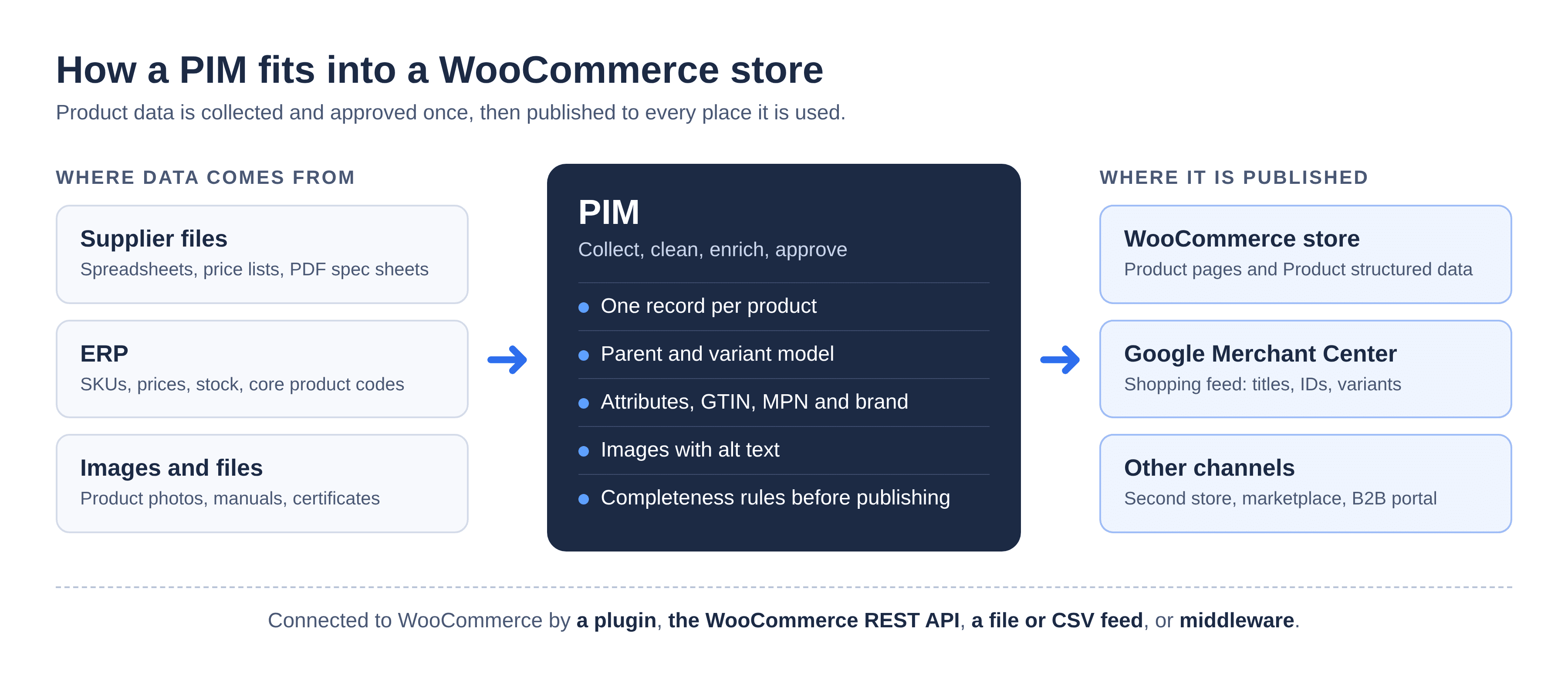
A PIM for WooCommerce is a system outside your store where product data is collected, cleaned, enriched and approved. It then sends that data to WooCommerce, and to any other channel, through a plugin, the WooCommerce REST API, a file feed or middleware. WooCommerce keeps doing the selling. The PIM keeps the data right.
In other words, each system does the job it was built for. WooCommerce displays products, takes orders and runs checkout. A PIM (product information management system) holds the product record: titles, descriptions, attributes, variations, identifiers and images. It also holds the rules that decide when a product is ready to publish.
Where Do WooCommerce Spreadsheets Stop Working?
WooCommerce’s built-in CSV importer handles bulk creates and updates well. It struggles as a catalog grows. Large files hit server limits, and variations depend on exact parent references. Rows only match on ID or SKU, image URLs must be downloadable, and each store needs its own file.
Each limit below comes straight from WooCommerce’s Product CSV Importer and Exporter documentation.
The import that half-works
Big files are where trouble starts. Your server, not WooCommerce, sets the maximum upload size, so raising it means asking your host. WooCommerce suggests splitting large files into batches instead. You also can’t refresh or leave the page while an import runs. On top of that, spreadsheet apps can quietly change formatting or encoding when you save.
Variations that land in the wrong place
Since WooCommerce 11.1, an update import can add new variations to an existing variable product. However, each new variation row needs an empty ID and a type of “variation”. It also needs a Parent value that points to the parent’s SKU or ID. That’s a lot to get right by hand across thousands of rows. One wrong Parent reference, and the variation ends up on the wrong product or doesn’t import at all.
Updates that miss their product
When you update products, WooCommerce matches each row by ID or SKU. If a supplied ID doesn’t match an existing product, WooCommerce skips the row. It won’t fall back to another identifier. So SKUs and IDs need to stay stable from one file to the next. Otherwise, updates miss the products they were meant for.
Images that won’t download
External image URLs only work when WooCommerce can download the image. Some hosts block your store, ask for a login, or return a web page instead of an image. When that happens, the image doesn’t come through. In addition, the core importer can’t add, edit or update alt text for product images. You have to fill that gap by hand, which hurts both accessibility and search.
Custom fields and a second store
Finally, anything outside the standard columns needs extra care. WooCommerce ignores unrecognized columns unless you map them, and custom data needs a “meta:” prefix in the header. Then there’s the second store. The importer can keep data consistent across stores, but each store still needs its own file and its own import. Every extra copy is one more place for data to drift.
None of this makes the importer a bad tool. For a small, stable catalog with one editor, it’s often all you need.
| Where spreadsheets stop | What WooCommerce’s documentation says | What a PIM changes |
| Large imports | Upload size is set at the server level. Split large files into batches. Don’t leave the page during an import. | Data is held and validated in the PIM, then sent in managed, repeatable runs. |
| Variable products | New variation rows need an empty ID, type “variation” and a Parent SKU or ID. | The parent and variant model is held once and mapped to WooCommerce on every sync. |
| Updates by ID or SKU | Rows match on ID or SKU. An unmatched ID is skipped. | Each product keeps one stable internal ID, so SKU changes are tracked, not lost. |
| Images | External image URLs must be downloadable. The core importer can’t set alt text. | Images and alt text are managed centrally. The WooCommerce REST API image object includes alt text, so an API connection can send it. |
| Several stores or channels | Each store needs its own file. Unrecognized columns are skipped unless mapped. | One record per product, with output mapped per store or channel. |
Signs Your WooCommerce Store Has Outgrown CSV Imports
You’ve outgrown CSV imports when fixing product data takes more time than selling. In a WooCommerce store, that usually shows up in five places. If two or more of these sound like your week, a PIM is worth a serious look.
- Large variation sets. Deciding what’s a variation and what’s an attribute has become a modeling job. WooCommerce’s dropdowns only filter dynamically up to 30 variations by default, to protect page speed. A PIM won’t change that, but it helps you plan the data model first.
- Google Merchant Center flags. Disapprovals or warnings keep coming back for titles, identifiers, images or variant grouping.
- More than one storefront. You run a second WooCommerce site, a marketplace or a B2B portal from the same products.
- Supplier ranges that need rework. Every new range needs hours of reformatting before import, often because nobody set supplier product data requirements up front.
- No view of the gaps. You can’t easily say which products are missing images, descriptions or required attributes.
If none of these is true yet, a disciplined CSV process is fine. Keep one master file, lock the column headers and test imports on staging first. The wider trade-offs of PIM vs spreadsheets apply on any platform. In WooCommerce, though, these five triggers usually tip the decision.
What Does Google Need from Your WooCommerce Product Data?
Google reads your product data in two places: the structured data on your product pages and your Merchant Center feed. According to Google’s introduction to Product structured data, providing both maximizes your eligibility for product experiences in Search. Both need to be accurate and consistent. That’s far easier when they come from one approved record.
Your Merchant Center feed
The Merchant Center product data specification sets firm rules for core fields. Get them wrong, and Google can disapprove products or limit where they show.
| Attribute | What Google requires | Why it trips up WooCommerce stores |
| id | Required. Max 50 characters. Keep it the same when you update your data. | If the SKU doubles as the ID, a changed SKU breaks the product’s history. |
| title | Required. Max 150 characters. Should match the landing page. | Titles edited in WooCommerce drift away from titles in the feed. |
| description | Required. Max 5,000 characters. Should match the landing page. | The same drift, across every edited product. |
| link, image_link | Required. Google must be able to crawl image URLs. | Images blocked by robots.txt or hosting rules. |
| price, availability | Required. Must match the landing page. | A price changed in one place but not the other. |
| brand | Required for all new products, except movies, books and musical recordings. | Often missing from supplier files. |
| gtin, mpn | GTIN strongly recommended where one exists. MPN required if there’s no manufacturer GTIN. | Identifiers live in supplier sheets, not in the store. |
| item_group_id | Required for variants in Brazil, France, Germany, Japan, the UK and the US. | Variants exported without a shared group ID. |
Google has also announced a minimum product image size of 500 x 500 pixels, with enforcement starting January 31, 2027.
Your product pages
On the page, Google uses Product variant structured data to see which products are versions of the same item. A ProductGroup links them through three properties. These are variesBy (what differs), hasVariant (the variants) and productGroupID (the parent ID). Google supports six variesBy values: color, size, suggestedAge, suggestedGender, material and pattern. Each variant also needs a unique ID, such as a SKU or GTIN. Google recommends placing Product markup in the initial HTML.
What WooCommerce outputs by default depends on your theme and plugins, so test a variable product before you rely on it.
AI answers
There’s no separate checklist for AI Overviews or AI Mode. Google’s guidance on AI features and your website lists no extra requirements, files or special markup. Instead, it asks for indexable, helpful pages, important content in text form, and current Merchant Center information. For a store, that comes back to clean product data.
This is the practical case for a PIM. It holds the title, description, identifiers, images and variant grouping once. Next, it checks them against your rules, such as title length or a required GTIN. Then it publishes the same approved version to the store and the feed.
How Does a PIM Connect to WooCommerce?
A PIM connects to WooCommerce in one of four ways. It can use a WordPress plugin, the WooCommerce REST API, a file or CSV feed, or a middleware platform. “Integration” can mean any of these, and they behave very differently. So the right question isn’t “does it integrate?” It’s “how, and what does it change?”
WooCommerce’s developer documentation calls REST API v3 the current, recommended version for new integrations. Its products API can create, view, update and delete products one at a time or in batches. The product variations API works the same way, with a default limit of 100 objects per batch. WooCommerce’s examples use a consumer key and secret to authenticate.
| Connection pattern | How it works | What to ask the vendor |
| Plugin or connector | An extension installed on your WordPress site pulls product data from the PIM. | What does it create, update and delete? Does it handle variations, images, categories and custom fields? How often does it sync? Who maintains it when WooCommerce updates? |
| REST API | The PIM pushes data into WooCommerce through the products, variations and batch endpoints. It may be configured or custom built. | Who builds and supports it? How are batch limits and rate limits handled? How are errors reported and retried? |
| File or CSV feed | The PIM generates a file in WooCommerce’s import format, loaded by the importer or a scheduled import tool. | Which fields and variation structures does it support? How often does it run? How are failures surfaced? The importer limits above still apply. |
| Middleware (iPaaS) | An integration platform sits between the PIM and WooCommerce and moves the data. | Who owns it and pays for it? What happens when either side changes its API? Who do you call when it breaks? |
Whichever pattern you’re offered, get three answers in writing: which fields it syncs, which way data flows, and who supports it after go-live. Also ask whether those fields stay editable in WooCommerce. If both systems can edit a field, you’ll end up with two versions of the truth.
How Pimberly connects to WooCommerce
Pimberly connects to WooCommerce through its open REST API or its file-based export channels, both included as standard. Our out-of-the-box connectors are for Shopify and BigCommerce. Our whitepaper on why ecommerce platforms work better with PIM looks at WooCommerce alongside other platforms.
Does Your WooCommerce Store Need a PIM Yet?
Not every WooCommerce store needs a PIM. The deciding factors are catalog size, product complexity, and how many people, suppliers and channels touch the data. Use this as a starting point, not a rule.
| If your store looks like this | What usually works |
| A few hundred products, one editor, one store | The WooCommerce importer plus a clean, disciplined spreadsheet process |
| Thousands of SKUs, variable products, several suppliers or a second storefront | A PIM is worth evaluating now |
| B2B or trade catalogs, customer-specific data, or marketplaces on top of the store | A PIM becomes close to essential |
Complexity matters as much as size. A few thousand products with deep variation sets can need a PIM sooner than a larger, simpler catalog.
To be clear about fit: Pimberly is built for catalogs with real scale and complexity. For a store with a few hundred products and one channel, a PIM of any kind is hard to justify, and we’d rather say so up front.
How to Move Off Spreadsheets Without Breaking Your Store
Move one slice of the catalog at a time. Start from a clean export and decide your data model. Then pilot one category on staging, and switch its updates to the PIM before you expand. Your live store keeps selling the whole time.
- Export your baseline. Use WooCommerce’s built-in exporter to pull your current catalog. This file is your starting point and your rollback plan.
- Audit and model. Review attributes, categories and variations. Decide what’s a variation, what’s a shared attribute, and which fields must be complete before a product can publish. Our guide to onboarding complex product data covers this step in more detail.
- Pick a pilot. Choose one category and one store. A range with variations and supplier data makes a better test than your simplest products.
- Load, validate and map. Bring the pilot into the PIM and fix whatever fails validation. Then map each field to WooCommerce and to your Merchant Center attributes.
- Test on staging. Run the full sync on a staging copy of your store. Check variations, images, alt text and the variant markup in the Rich Results Test.
- Switch the source of truth. Move that category’s updates to the PIM, and stop editing those fields in WooCommerce. One field, one owner.
- Expand in waves. Add more categories next, then suppliers, then other channels.
Where WooCommerce PIM Projects Go Wrong
Most problems come from process, not software. Three come up again and again.
- Two systems editing the same fields. If your team still edits titles in WooCommerce after the PIM goes live, the next sync overwrites their changes. Decide which system owns each field, then stick to it.
- Skipping staging. A sync that looks right in a test file can still misplace variations or drop images on a live store.
- Loading messy data. A PIM won’t clean data by itself. If you load duplicates and inconsistent attributes, you’ll simply publish them faster. Clean up duplicate product data first.
FAQs
Q: Do I need a PIM if I use WooCommerce?
A: Not always. A store with a few hundred products, one editor and one channel can usually manage with the WooCommerce importer and a tidy spreadsheet. A PIM becomes worth it with thousands of SKUs, large variation sets, several suppliers, or more than one storefront or channel to keep consistent.
Q: Can’t I just use the WooCommerce CSV importer?
A: Yes, for a small, stable catalog. The importer is built into WooCommerce and handles bulk creates and updates. At scale, its documented limits start to bite. These include server upload limits, strict variation rows, matching only by ID or SKU, and no way to set image alt text.
Q: How does a PIM connect to WooCommerce?
A: There are four common patterns: a WordPress plugin or connector, the WooCommerce REST API, a file or CSV feed, or a middleware platform. Each handles variations, images and errors differently. Before you choose, ask what the connection creates, updates and deletes, how often it runs, and who supports it after go-live.
Q: Does a PIM replace WooCommerce or slow my store down?
A: No. A PIM sits outside your store. WooCommerce still runs your storefront, cart and checkout, while the PIM manages the product data behind them. Shoppers never touch the PIM. Large syncs do use your store’s server resources, though, so schedule big updates for quieter hours.
Q: Can a PIM handle WooCommerce variable products and attributes?
A: Yes. A PIM holds the parent product, its variants and their attributes as one structured model. It then maps them to WooCommerce’s variable product format on each sync, so nobody hand-builds variation rows. It also keeps variant and group IDs consistent for Google Merchant Center.
Q: What product data does Google Shopping need from a WooCommerce store?
A: Google Merchant Center requires an ID, title, description, link, image link, price and availability for every product. Brand is required for most new products. GTIN is strongly recommended where one exists, and MPN is required without a GTIN. Variants also need an item_group_id in the US, the UK and several other countries.
Q: What happens to my existing WooCommerce products when I start using a PIM?
A: They stay live. You export your current catalog from WooCommerce as a baseline, load it into the PIM and clean it there. Then you switch one category at a time to the PIM as its source of truth. Products you haven’t moved yet keep running exactly as they do today.
Q: Is a PIM only for large WooCommerce stores?
A: Mostly, yes. A PIM’s value grows with catalog size, product complexity, suppliers and channels. A small store with simple products may get more from tidy CSV habits. Complexity counts as much as size, though, so a few thousand highly variable products can justify one.
Q: How much does a PIM for WooCommerce cost?
A: It varies widely by vendor, catalog size, users and how the connection is built. Ask for the license cost and the integration cost separately, because a plugin, custom API work or middleware can each add fees. Also check what’s included, such as users, storage and digital asset management.
Q: Does Pimberly have a WooCommerce plugin?
A: Not a native plugin. Pimberly connects to WooCommerce through its open REST API or its file-based export channels, both included as standard. Its out-of-the-box connectors are for Shopify and BigCommerce. Either way, product data is managed in Pimberly and published to your WooCommerce store.
Keep the Store Selling and the Data Right
WooCommerce is very good at running a store but nobody built it to reconcile thousands of products, dozens of suppliers and several channels. The CSV importer can move data, but it can’t govern it. So once your catalog outgrows it, the answer isn’t a bigger spreadsheet. It’s one approved record per product that feeds your store, your Google feed and AI answers the same way.
Pimberly is built for that job, and it works alongside your WooCommerce store rather than replacing it.

"With Pimberly we are able to get rich data, right the first time."
JD Sports

A super-quick run through of the key features of Pimberly’s key PIM, DAM and automation functionality.



