
Table of Contents
- What Is a PIM for Manufacturing?
- PIM vs ERP vs PLM: Which System Owns Which Product Data
- Where Manufacturing Product Data Breaks Down
- What Product Data Lives in a Manufacturing PIM
- How PIM Fits the Manufacturing Tech Stack
- How Manufacturers Get Product Data to Distributors
- Why AI-Ready Product Data Starts With PIM
- Signs Your Manufacturing Business Needs a PIM
- What to Look for in a PIM for Manufacturing
- How to Implement PIM as a Manufacturer
- PIM for Manufacturing in Action: The ATA Group
- FAQs
- The ERP and PLM Were Never Meant to Publish
Key Takeaways
- PIM, ERP, and PLM own different product data. The ERP knows what a product is and costs, the PLM knows how it was engineered, and a PIM knows how to describe, enrich, and publish it. None replaces another.
- Most manufacturing product data problems start at the handoffs between systems, not inside any single one.
- A manufacturing PIM holds more than the ERP item record: technical attributes, parts and kit relationships, CAD and compliance documents, and the data digital product passports will require.
- Getting clean product data to distributors depends on classification standards and syndication, not on rebuilding a spreadsheet by hand for every channel.
What Is a PIM for Manufacturing?
PIM is software that pulls product data from the ERP, PLM, and engineering files into one governed record, enriches it into the descriptions, attributes, assets, and documents each channel needs, and publishes it to your website, distributors, marketplaces, and spec sheets.is software that pulls product data from the ERP, PLM, and engineering files into one governed record, enriches it into the descriptions, attributes, assets, and documents each channel needs, and publishes it to your website, distributors, marketplaces, and spec sheets.
In practice, a PIM does four jobs for a manufacturer.
It centralizes. Instead of a dozen spreadsheets and three systems of record, every product gets one governed record, fed automatically by the systems that already hold the source data.
It enriches. Raw engineering and operational data becomes something a buyer can actually use: written descriptions, normalized attributes, images, and documents.
It governs. Completeness rules, approval workflows, and version control mean a product doesn’t publish until it meets a defined bar, and nobody is left guessing which version is current.
It publishes. The same governed record generates a different output for every channel, from a distributor’s 90-column template to a PDF spec sheet, without anyone rebuilding the product by hand each time.
Centralize, enrich, govern, publish: that’s the core mechanism behind what a PIM does in any industry. Manufacturing just adds a few more source systems and a few more compliance stakes to it.
PIM vs ERP vs PLM: Which System Owns Which Product Data
Manufacturers almost always already run an ERP, and usually a PLM too, which is exactly why “we already have a system for this” is the most common objection to adding a PIM. The objection misunderstands what each system is for.
The ERP knows what the product is and what it costs. The PLM knows how it was engineered. The PIM knows how to describe, enrich, and publish it. None of the three replaces another, and a PIM without an ERP integration is as broken as an ERP asked to publish marketing content.
| Data | System of record | Why |
| Part number, cost, price, inventory, lifecycle status | ERP | Transactional. Drives orders and fulfillment. |
| Engineering specs, BOM, revisions, CAD source files | PLM / PDM | Controlled by the engineering change process. |
| Marketing descriptions, feature bullets, normalized attributes, images, spec sheets, translations, channel versions | PIM | Built to be enriched, approved, and published. |
The boundary matters more than the acronyms. PIM and PLM split along engineering versus commercial ownership, PIM and ERP split along operational versus sellable data, and the same logic extends to where MDM and PDM sit alongside both.
Where Manufacturing Product Data Breaks Down
A Distributor Asks for Your Product Content
Their onboarding template wants 90 columns: attributes in their naming convention, their units, images at their exact specification, and a spec sheet PDF for every SKU. Someone exports what they can from the ERP, emails engineering for the dimensions that are missing, and rebuilds the rest in Excel by hand. Three weeks later, it goes back. The next distributor’s template uses different units and a different column order, so the work starts over, because none of the first round gets reused.
An Engineering Revision Never Reaches the Channel
PLM moves a product to revision C: a changed voltage rating, a new mounting dimension. The ERP picks up the change because it has to, for cost and stock purposes. The spec sheet on your website and the one sitting in a distributor’s portal still show revision B, because nothing connects that document to the engineering change that made it wrong. A contractor orders based on what they can see, gets the wrong unit, and the return lands on the distributor first, then on you.
Spec Sheets Are Built by Hand
Each spec sheet is an InDesign or Word file someone edits manually whenever a product changes. Over a few years, there are as many versions of that file as there are people who have touched it, scattered across shared drives and old email threads. Nobody can say with confidence which copy is current, including the person being asked. Multiply that across a catalog of a few thousand SKUs, and spec sheet accuracy becomes a matter of luck rather than process.
Parts and Compatibility Live in People’s Heads
Which replacement part fits which model. What supersedes what. Which accessories and kits go with which product series. For most manufacturers, that knowledge sits in one experienced person’s spreadsheet, or in their head, and nowhere a customer or distributor can see it. When that person is out, or leaves, the knowledge doesn’t transfer with them, and the next person reconstructs it from scratch, one support ticket at a time.
Compliance Data Is Scattered
Certifications, safety data sheets, Prop 65 warnings, material declarations: each one sits in a folder owned by whichever team last needed it, quality, legal, engineering, sales. That’s a problem today, when a distributor or auditor asks for a document and nobody can locate the current version quickly. It becomes a bigger one if a manufacturer sells into the EU and digital product passport requirements apply, because a DPP needs all of that data connected to a specific product, not scattered across departments.
What Product Data Lives in a Manufacturing PIM
A manufacturing PIM holds everything a buyer, distributor, or regulator needs to understand, find, and legally sell a product, which is a lot more than the ERP’s item record. Four categories make up most of it.
Technical Attributes and Classification
Normalized attributes with consistent units, voltage, BTU, NPT size, IP rating, and classification against the standards distributors actually filter by, such as ETIM or UNSPSC. Normalization is the part that gets skipped and causes the most friction: a distributor filtering by “1/2 in.” won’t find a product entered as “0.5 in.,” even though they’re the same part. Showcasing technical attributes properly is as much about consistency as completeness.
Parts, Kits, and Aftermarket Relationships
Replacement parts, supersessions, cross-references, accessories, kits, and model compatibility. An ERP’s bill of materials describes how a product was built. It doesn’t describe what a buyer needs twelve years later to find the right replacement part for a model that’s been through three revisions since.
CAD Files, Assets, and Spec Sheets
CAD and BIM files, product images, install manuals, wiring diagrams, safety data sheets, and spec sheets generated from the live product record instead of maintained by hand. Pimberly includes DAM alongside PIM, so assets stay attached to the correct product and the correct revision instead of drifting apart from it.
Compliance and Digital Product Passport Data
Certifications such as UL, CSA, and ENERGY STAR, RoHS and REACH declarations, Prop 65 warnings, and the material and lifecycle data behind them. The next part applies specifically to manufacturers selling into the EU, not to domestic US sales on their own. The EU’s Ecodesign for Sustainable Products Regulation is phasing in digital product passport requirements by product category through 2030, starting with groups like textiles, iron and steel, and tires, and extending into furniture, aluminium, and electrical and electronic equipment. Any manufacturer exporting into the EU in an affected category will need this data compiled and connected to a specific product, not scattered across departments, which is exactly the structure a digital product passport requires a PIM to hold.
How PIM Fits the Manufacturing Tech Stack
A PIM sits between the systems that create product data and the channels that consume it, and its value depends entirely on both sides being connected. Disconnect either side and you’re back to manual exports and stale spec sheets.
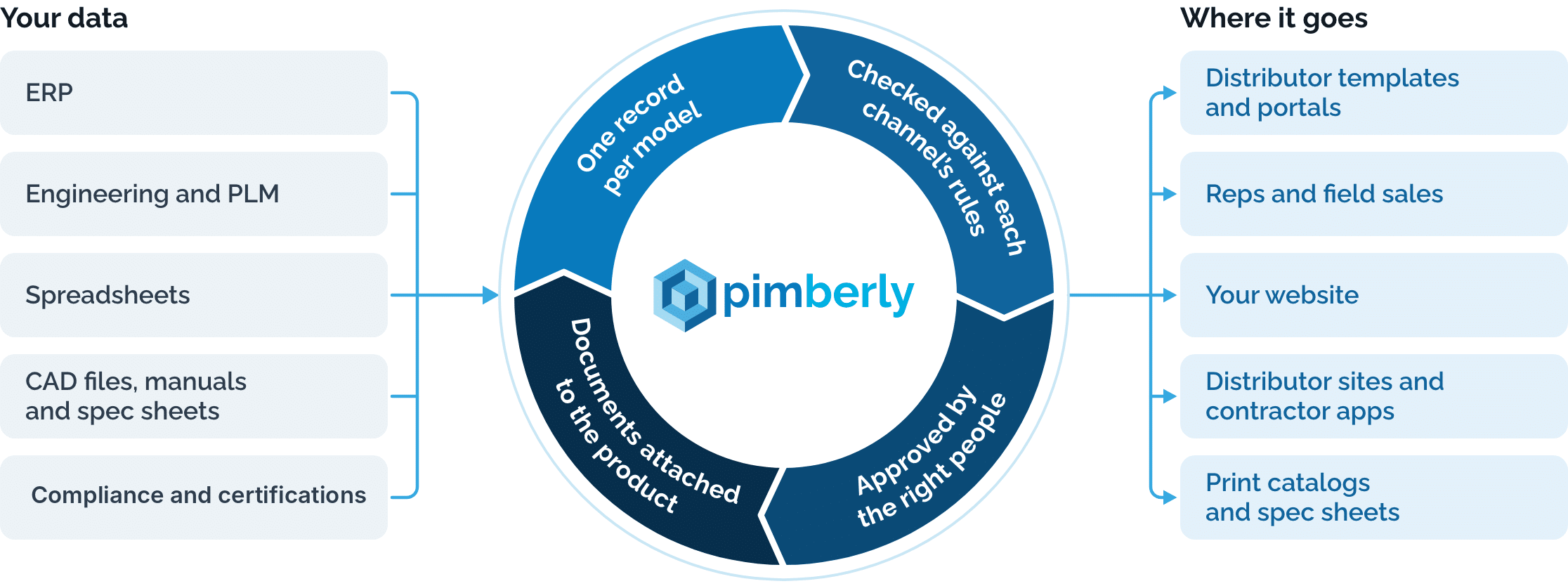
Data moves one direction on each side: operational and engineering data flows in from the source systems, enriched content flows out to the channels. A PIM that tries to do both at once, writing back to the ERP or replacing PLM’s engineering record, is the fastest way to create two conflicting versions of the truth, which is usually where the “our ERP already does this” objection gets its evidence.
ERP
Part number, price, lifecycle status, and inventory flow into the PIM automatically. The PIM never overwrites them, since the ERP stays the system of record for anything transactional.
PLM / PDM
Released specs and revisions flow in once engineering signs off. Work-in-progress and unreleased changes stay out, so nothing half-finished reaches a channel.
Supplier and Component Data
Onboarding data from component suppliers and OEM partners flows in through a structured intake process rather than an inbox full of spreadsheets.
Website and B2B eCommerce
The enriched, governed record publishes out, formatted for however your site or storefront is built.
Distributors, Data Pools, and Marketplaces
Channel-formatted feeds publish out automatically, mapped to each destination’s own template and attribute names.
CRM and CPQ
Sales and quoting tools read current specs directly from the PIM instead of a rep emailing engineering to confirm a dimension before a quote goes out.
This is the layer that makes the ownership boundary from the PIM vs ERP vs PLM section actually hold in practice, not just on paper.
How Manufacturers Get Product Data to Distributors
For most manufacturers selling through electrical, HVAC/R, plumbing, or industrial supply channels, the distributor’s website is where the buyer sees your product. The quality of what you send them is your digital shelf, whether or not you sell direct yourself.
What Distributors Ask For
A typical onboarding template runs to dozens of columns: required attributes, recommended attributes, image specifications such as resolution, background, and file type, document requirements, and an expected update cadence. It’s common to see 90 or more fields in a single template, mixing required technical attributes with optional marketing copy, each using its own naming convention and units.
Industry Data Standards
Electrical distribution increasingly runs on ETIM for classification, alongside IDEA’s data standards, used across electrical wholesale in North America (the two organizations have been aligning rather than competing). Automotive aftermarket distribution runs on ACES and PIES. HVAC/R and plumbing distributor requirements vary more by region and by which data pool a distributor belongs to, so confirm the specifics on a channel-by-channel basis rather than assuming one standard covers all of them.
Spreadsheets vs. Syndication
Emailing a file per distributor works until you have more than a handful of them, at which point every product change means updating as many files as you have channels, each slightly differently formatted. Syndication maps one governed record to many channel templates, validates it against each one’s rules before anything sends, and pushes updates automatically when the source record changes.
What Gets Rejected and Why
Missing required attributes, inconsistent units, low-resolution images, and outdated spec sheets account for most onboarding rejections. Each one traces back to the same root cause: the data reaching the distributor didn’t come from a single governed source, whether the breakdown happened upstream in supplier data quality or downstream in how distribution networks handle product data once it arrives.
Why AI-Ready Product Data Starts With PIM
AI search tools and shopping agents answer product questions from whatever structured, consistent data they can find on your site and your distributors’ sites. They don’t call your sales team to ask a clarifying question. If your attributes are thin or inconsistent between channels, your product doesn’t get recommended or compared. It gets skipped in favor of whichever listing was easier to parse.
This is where AI inside a PIM earns its place, not as a chatbot bolted onto the front end, but drafting descriptions and attribute values from your own spec sheets and manuals, with a person approving before anything publishes, the same human-in-the-loop line that separates agentic PIM from the fully autonomous agentic commerce some vendors pitch, and the reason well-structured products are the ones that end up recommended by AI shopping agents in the first place.
Signs Your Manufacturing Business Needs a PIM
A few signs are reliable enough to act on:
- Your team rebuilds the same product data for every distributor template
- Spec sheets are edited by hand and nobody is sure which version is current
- Engineering changes reach the website weeks after they’re released
- Parts compatibility lives in one person’s spreadsheet
- Launching a product line means a month of data gathering before anything sells
- You can’t say which SKUs are missing images, documents, or required attributes
- Compliance documents are stored by whoever happens to own that certification
What to Look for in a PIM for Manufacturing
Whatever you’re evaluating, a few capabilities separate a PIM built for manufacturing complexity from a general-purpose one. This list works regardless of which platform you’re comparing it against.
- A flexible data model that handles parts, kits, and relationships, not just flat product records
- Pre-built or proven integrations with the ERP and PLM systems you already run
- DAM with CAD and technical document support, so assets stay attached to the right product and revision
- Automated spec sheet generation, so a document updates when the underlying data does
- Channel and distributor template mapping with validation built in before anything sends
- Completeness scoring and data quality rules that catch gaps before a distributor does
- Workflows and approvals that match how your team actually signs off on product data
- AI enrichment grounded in your own spec sheets and manuals, not generic web content
Few platforms score well across all eight at once, which is usually where a confident demo and a real catalog start to diverge. Pimberly is built around this specific combination for manufacturers, and our comparison of PIM systems for manufacturers tests each platform against it directly.
How to Implement PIM as a Manufacturer
Start with one product line and one channel, not the whole catalog. Trying to onboard everything at once is the most common reason PIM projects stall before they show value.
- Audit where each attribute lives today, system by system
- Assign a system of record to every field. The system-of-record table from the PIM vs ERP vs PLM section earlier becomes your working document here
- Choose a pilot product line and a single distributor feed to target first
- Build the data model and classification for that pilot scope
- Connect the ERP first, since it anchors part numbers and cost, then bring in PLM once released specs are flowing cleanly
- Enrich the pilot catalog, set completeness rules, and run it through approval
- Publish to the pilot channel, confirm it holds up, then expand line by line and channel by channel
How long each step takes varies by catalog size and how many systems you’re integrating, but the pilot-first approach is what keeps timelines predictable rather than open-ended. If building the business case is part of the conversation, the ROI of PIM whitepaper walks through how to calculate the return before you start.
PIM for Manufacturing in Action: The ATA Group
ATA Group, a precision engineering manufacturer operating in more than 90 countries through a network of over 3,000 distributors, managed its product data the way a lot of manufacturers still do: more than 19,000 products spread across spreadsheets, with language variants required for every market it sold into.
After implementing Pimberly, ATA onboarded that full catalog in five days and cut manual labor hours on product data by 30%. “By automating and streamlining the way we now manage product data, we’ve been able to reduce manual labor hours by 30%,” says Charlie Kavanagh, Group eCommerce & Digital Marketing Manager at ATA Group. The company now manages more than 25,000 products across six brands through the same governed record.
Nothing about ATA’s ERP or its engineering process changed. What changed was the handoff between production data and the market, the exact gap this guide has been walking through.
FAQs
Q: Do manufacturers need a PIM if they already have an ERP?
A: Yes, if you sell through more than one channel. The ERP is the system of record for part numbers, pricing, and inventory, but it isn’t built to store rich descriptions, normalized attributes, assets, or channel-specific versions. A PIM pulls core data from the ERP and adds everything needed to publish it.
Q: What’s the difference between PIM and PLM in manufacturing?
A: PLM manages how a product is engineered: specs, BOMs, revisions, and change control. PIM manages how it’s described and sold: enriched attributes, copy, assets, and channel outputs. The PIM takes released data from PLM, so engineering stays the source of truth for specs.
Q: Can a PIM manage CAD files and technical documents?
A: A PIM with built-in DAM can store CAD and BIM files, manuals, wiring diagrams, and safety data sheets against the right product and revision, so every channel receives the current version. Engineering keeps the native source files in PLM or PDM.
Q: How does a PIM help manufacturers work with distributors?
A: It maps one product record to each distributor’s template, checks required attributes and formats before sending, and pushes updates when data changes. That replaces rebuilding a spreadsheet for every distributor and every product change.
Q: How does PIM handle spare parts and supersessions?
A: It stores relationships between products: which parts fit which models, what supersedes what, and which accessories and kits go together. Those relationships can then be published to your site and distributor channels so buyers find the right replacement.
Q: Does a PIM help with digital product passports?
A: Yes. A PIM centralizes the structured material, compliance, and lifecycle data that digital product passport requirements under the EU’s Ecodesign for Sustainable Products Regulation will call for, compiled against a single governed product record rather than scattered across departments.
Q: How long does PIM implementation take for a manufacturer?
A: It depends on catalog size and how many systems you’re integrating, but a pilot-first approach, one product line and one distributor feed before expanding, is what keeps timelines predictable.
Q: Is PIM only for manufacturers that sell online?
A: No. Most manufacturers use PIM to supply distributors, generate spec sheets and print catalogs, and give sales teams current product data. Direct eCommerce is one output among several.
The ERP and PLM Were Never Meant to Publish
Manufacturers already run the systems this guide has walked through: the ERP, the PLM, the spreadsheets holding everything else. What’s usually missing isn’t a new system to replace them. It’s the layer that pulls from all three, turns operational and engineering data into something a channel can use, and keeps it that way as revisions happen.
That’s the specific job Pimberly does for manufacturers, built around the ERP and PLM integrations, the classification standards, and the distributor handoffs this guide has covered. If you want to see how it applies to your own catalog, see how Pimberly works for industrial manufacturers. the place to start.

"With Pimberly we are able to get rich data, right the first time."
JD Sports

A super-quick run through of the key features of Pimberly’s key PIM, DAM and automation functionality.



