What is Agentic PIM? And Why It’s Not Agentic Commerce
If you’re trying to figure out what an “agentic PIM” means, you’re not alone, and you’re not behind. Vendors have been racing to put the...

Published: Oct 10, 2022 Updated: Aug 11, 2026
PIM vs PLM confusion is common among manufacturers and distributors. Teams often run two separate systems, one in PLM and one in a spreadsheet, because nobody mapped how data should move between them. The result: sales teams work from specs that are already out of date, and compliance documents that don’t match what’s on the production floor. Product listings take weeks longer to go live than they should.
Product Lifecycle Management (PLM) and Product Information Management (PIM) solve different halves of that problem. PLM handles product development, and PIM handles getting it to market. Knowing exactly where one stops and the other starts, and how data should flow between them, is the difference between a clean product launch and a scramble.
This guide breaks down what each system does, when you need one, and when you need both. It also covers the part most PLM vs PIM comparisons skip: the mechanics of the handoff itself.
Product Lifecycle Management (PLM) software manages a product’s life from ideation through design, engineering, manufacturing, and retirement. It’s built for the teams turning an idea into a manufacturable product: R&D, engineering, quality, and manufacturing.
A PLM system centralizes everything those teams need to collaborate: design files, CAD drawings, engineering specs, and revision history. It’s also where the Bill of Materials (BOM) lives, listing every component and material in a product, which teams use to calculate standard cost and evaluate manufacturer bids.
PLM systems typically integrate directly with CAD software, so design changes update on their own across every linked document. Everyone working on the product, whether an internal engineer, a supplier, or a contract manufacturer, sees the same version of the truth as the design evolves.
What PLM doesn’t do is prepare a product for sale. A PLM system holds engineering attributes, not marketing copy. It manages revision history, not localized product descriptions for five different marketplaces. That handoff is where PIM comes in.
Product Information Management (PIM) software is the central hub for product data and digital assets once a product is ready to sell. It pulls data from ERP, PLM, suppliers, and other internal systems. Then it enriches, localizes, and syndicates that data to every sales channel: your website, marketplaces, distributor portals, and retail partners.
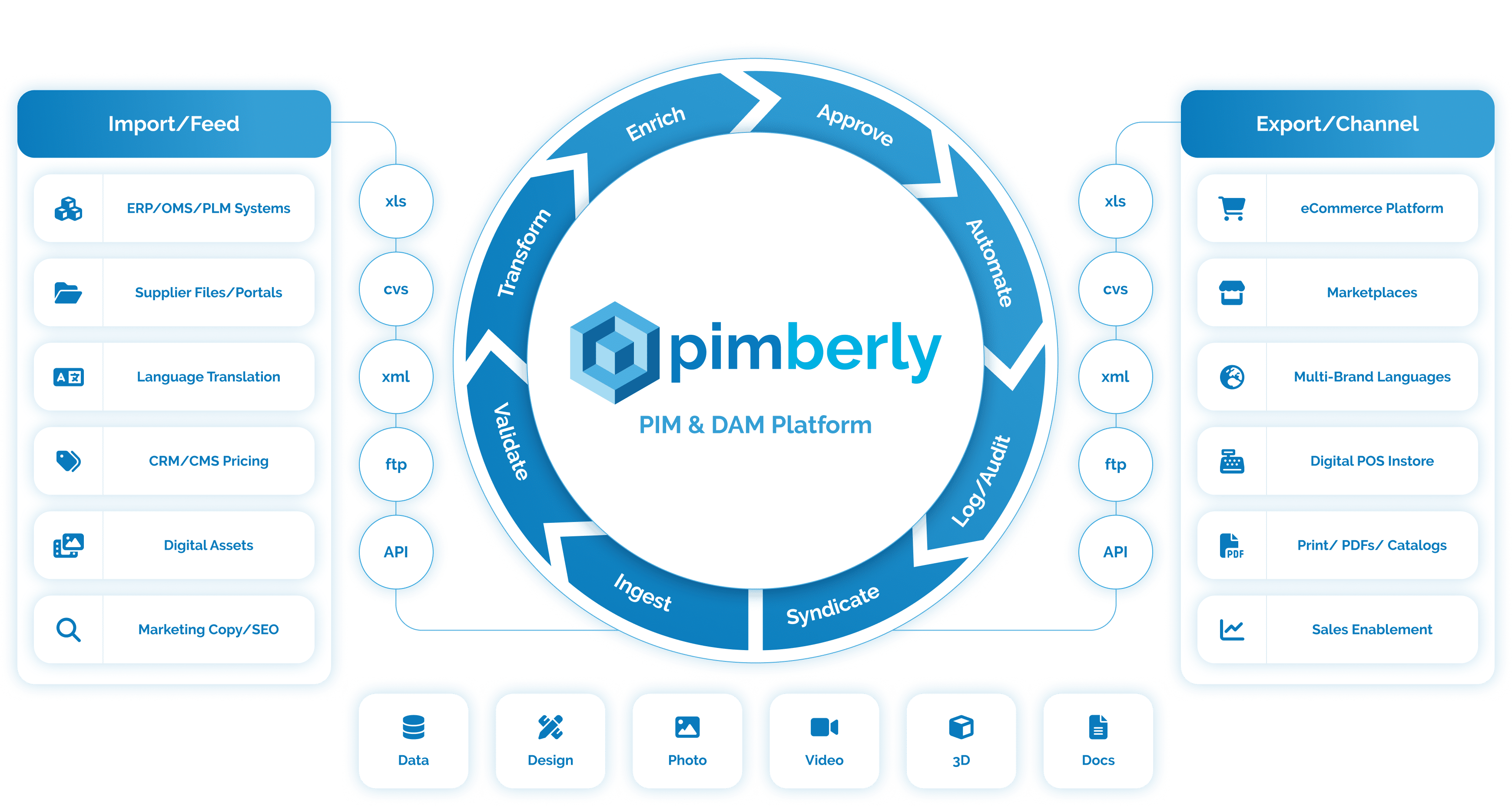
Where PLM manages a product’s development, PIM manages its commercial life. That covers product descriptions in multiple languages, imagery and video through digital asset management, sizing and spec sheets, and any compliance records your channels require. A PIM becomes the single source of truth for how a product appears everywhere it’s sold.
You might search for PLM vs PIM or PIM vs PLM, but either way, the table below shows where each system starts and stops.
| PLM | PIM | |
|---|---|---|
| Primary purpose | Manage product design, engineering, and manufacturing | Manage product content for commercialization across every sales channel |
| Lifecycle stage | Ideation through manufacturing | Enrichment through sale |
| Primary users | R&D, engineering, quality, manufacturing | Marketing, eCommerce, sales, category management |
| Data managed | CAD files, BOMs, engineering specs, compliance and revision history | Product descriptions, imagery, pricing, channel-specific attributes, localized content |
| Key outputs | Manufacturable product design, cost data, supplier documentation | Channel-ready listings, marketplace feeds, spec sheets, marketing assets |
| Relationship to the other | Feeds technical and compliance data downstream into PIM | Enriches and distributes what PLM produces to every sales channel |
This is the part most PLM vs PIM comparisons leave vague: the two systems aren’t competing for the same job. They sit on either side of the same handoff, and how well that handoff works determines how fast, and how accurately, your products reach the market.
Use a PLM system if your team is doing any of the following:
Use a PIM if your team is doing any of the following:
Most PLM vs PIM comparisons, including the earlier version of this post, answer one question too vaguely. What moves from PLM into PIM, and what happens to it once it gets there?
What leaves PLM:
What PIM does with it:
Most quality problems in product data don’t start in PIM. They start in the handoff. If technical specs move from PLM to PIM manually, through a spreadsheet or an email, errors and delays compound. That happens right at the stage when the product is about to go live everywhere at once.
An industrial equipment manufacturer finishes engineering a new product line in PLM: the BOM is finalized, CAD drawings are approved, and compliance records are in place. That product needs to go live on the company’s own site, a major distributor’s portal, and Amazon, all at once. Each channel has different data requirements and formatting rules.
Without a PIM, someone has to manually reformat the same technical specs three different ways. They also have to keep all three in sync every time engineering issues a revision. With a PIM pulling structured data from PLM, that product gets enriched once and syndicated everywhere. Compliance records, technical specs, and imagery stay consistent across every channel on their own.
This is the PLM vs PIM scenario Pimberly’s manufacturer and distributor customers describe most often. The problem was never a lack of product data. It was that the data lived in the wrong place at the wrong stage, and nobody owned the handoff.
One more reason this handoff matters: AI shopping agents and other AI-driven discovery tools evaluate structured product data feeds directly. If your PLM-to-PIM handoff is manual or inconsistent, the data reaching those channels will be uneven too. That makes your products harder for AI agents to find, compare, and recommend, and not just for human shoppers either.
Both systems exist to reduce the time it takes for your products to go to market, but they work on opposite ends of that timeline. Here’s the direct answer, not the fence-sitting one.
If you’re at the design and manufacturing stage, start with PLM. You need a system built for engineering complexity, revision control, and supplier collaboration, not a PIM.
If you’re selling products across multiple channels, you need a PIM. Even a great product will underperform if its content is uneven, incomplete, or slow to reach the channels where customers are buying.
If you’re doing both, which most manufacturers and distributors at scale are, you need both systems, connected. Grand View Research projects the global PLM market to grow from USD 52.4 billion in 2026 to USD 93.1 billion by 2033, an 8.5% CAGR, which tells you PLM investment isn’t slowing down. The question isn’t whether to invest in product development systems. It’s whether that investment reaches your sales channels, or gets stuck at the handoff.
IBM’s Institute for Business Value found 43% of chief operations officers name data quality as their single most pressing priority. That’s ahead of every other data challenge they manage. For manufacturers and distributors, a broken or manual PLM-to-PIM handoff is one of the most common places that pressure originates. Technical specs get re-entered by hand. Compliance data falls out of sync, and product listings take weeks longer to go live than they should.
Q: Do I need both PLM and PIM?
A: PLM vs PIM isn’t really an either/or question for most manufacturers. If you design and manufacture products, and you sell them across more than one channel, yes, you need both. PLM manages the product before it’s sellable, and PIM manages it after, so most manufacturers and distributors at scale need both, connected.
Q: PLM vs PIM: what’s the difference?
A: PLM manages the product development lifecycle: design, engineering, manufacturing, and revision history. PIM manages the commercial lifecycle: enriching, localizing, and distributing product content to every sales channel. PLM answers how a product is made. PIM answers how a product is sold.
Q: Can a PIM replace a PLM?
A: Not for meaningful product development work. A PIM can hold light product lifecycle data, such as tracking stage completeness or attaching multiple identifiers to a product, but it isn’t built for CAD integration, BOM management, or engineering revision control. For serious design and manufacturing complexity, you need a dedicated PLM.
Q: How does data move from PLM to PIM?
A: Technical specs, the Bill of Materials, compliance records, and CAD metadata move from PLM into PIM, usually through an integration or structured export. PIM then enriches that data with marketing copy, imagery, and channel-specific formatting before distributing it everywhere the product is sold.
Q: What is the difference between PIM and PDM?
A: Product Data Management (PDM) is often confused with PIM, but it’s closer to a lighter version of PLM, focused on managing engineering files and design data. PIM and PDM serve different stages of the product lifecycle for the same reasons PLM and PIM do.
Pimberly isn’t a replacement for a standalone PLM system, and for complex product development work, you’ll still need one. But Pimberly’s PIM includes light product lifecycle capabilities:
For manufacturers and distributors working through the PLM vs PIM handoff daily, that means one less separate system. It also means technical accuracy from engineering survives the trip, from the design floor to the sales channel.

A super-quick run through of the key features of Pimberly’s key PIM, DAM and automation functionality.

"With Pimberly we are able to get rich data, right the first time."
JD Sports





