What is Agentic PIM? And Why It’s Not Agentic Commerce
If you’re trying to figure out what “agentic PIM” means, you’re not alone, and you’re not behind. Vendors have been racing to put the word...

Published: Aug 8, 2023 Updated: Aug 11, 2026
If your company designs products and sells them, chances are you’re managing two very different kinds of product data, and possibly two separate systems to handle them. Product Data Management (PDM) and Product Information Management (PIM) are often confused, but they serve distinct roles at different stages of the product lifecycle.
This guide breaks down what each system does, where they differ, and how to decide which one your organization actually needs.

Product Data Management (PDM) is a software system that stores and manages the technical data generated during product design and engineering. That includes CAD files, bills of materials (BOMs), engineering specifications, revision histories, and compliance documentation.
PDM systems are built for engineering teams. Their primary job is to ensure that design data is accurate, version-controlled, and accessible to the right people at the right time — without anyone accidentally overwriting someone else’s work or shipping an outdated spec to a manufacturer.
Well-known PDM platforms include PTC Windchill, Siemens Teamcenter, and SolidWorks PDM. These tools are purpose-built for the engineering environment and are widely used across manufacturing, automotive, aerospace, and industrial equipment sectors.
Product Information Management (PIM) is a system that centralizes, enriches, and distributes the commercial product data needed to sell a product. That means marketing descriptions, pricing, images, attributes, translations, channel-specific content, and anything else a customer or partner needs to understand and purchase a product.
Where PDM handles how a product is built, PIM handles how it’s presented. PIM systems are used by marketing, eCommerce, and product content teams to create a single source of truth for customer-facing data, distributing it consistently across every sales channel, from your website to Amazon to a printed catalog.

The clearest way to understand the difference is to look at who uses each system, what data it manages, and what it’s optimized for.
| PDM | PIM | |
|---|---|---|
| Primary Users | Engineers, designers, R&D teams | Marketing, eCommerce, product content teams |
| Data Types | CAD files, BOMs, specs, revisions | Descriptions, attributes, images, pricing, translations |
| Product Stage | Design & engineering | Go-to-market & selling |
| Core Goal | Version control and design accuracy | Channel-ready content and commercial consistency |
| Integrates With | CAD tools, ERP, PLM (SolidWorks, AutoCAD) | eCommerce (Shopify, BigCommerce), marketplaces, ERP, DAM |
| Managed By | Engineering / IT | Marketing / eCommerce / Operations |
| Output | Approved technical specs for manufacturing | Published listings, catalogs, channel feeds |
PDM and PIM don’t compete. They operate at different stages of the same product journey. PDM owns the product during design and engineering. PIM takes over once it’s ready to be sold. In practice, the two systems work best when they’re connected directly via API or middleware.
When that integration is in place, an engineering approval in PDM automatically triggers a product record in PIM, where the content team can begin enrichment, add imagery, write channel-specific descriptions, and push listings live. No spreadsheet handoff, no re-keying data, no chasing down specs.
Where they don’t overlap is equally important to understand. A PDM will never handle marketing localization. A PIM will never manage CAD revision history. The boundary between them is clear, and that clarity is actually what makes the integration work: each system does its job, and the two hand off cleanly to one another.
It’s easy to underestimate how much a PDM-to-PIM gap costs until you’ve experienced it firsthand. When engineering data doesn’t flow cleanly into your commercial content system, you get:
In manufacturing and distribution, where SKU counts can run into the tens of thousands and product specifications are safety-critical, this isn’t just inefficiency. It’s a liability. According to a 2025 IBM Institute for Business Value report, 43% of COOs cite data quality as their most pressing data priority, and it’s easy to see why. More than one in four organizations estimate they lose over $5 million annually from poor data quality alone.
For most product teams, this is the decision that matters. Here’s a practical framework for thinking it through.
You probably need PDM if:
You probably need PIM if:
You need both if:
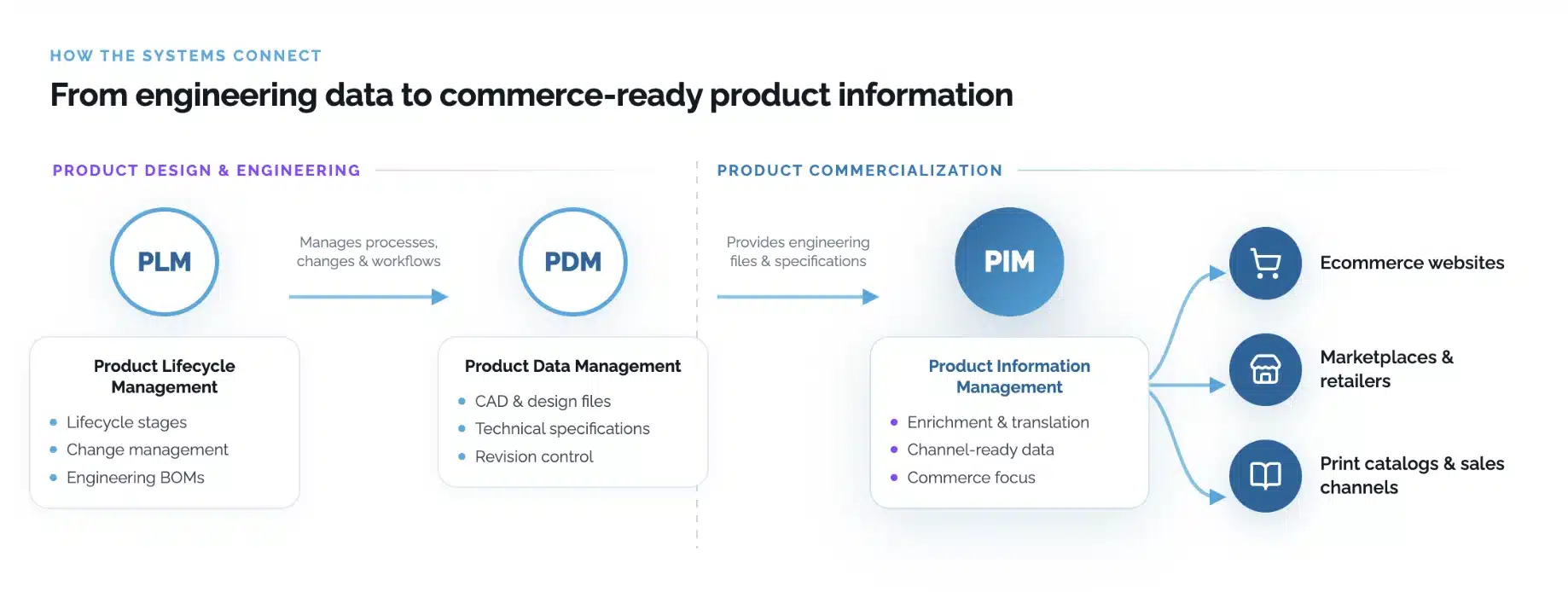
One clarifying note on PLM: Product Lifecycle Management sits above both systems, managing the full product lifecycle from concept through end-of-life. PDM is often a subset of PLM focused specifically on design data. If your organization already runs a PLM platform, PDM and PIM typically sit within or alongside it, with PIM handling the commercial layer that PLM doesn’t cover.
For most manufacturers and technical distributors, the answer is both, introduced in stages. PDM typically comes first during the product development phase, and PIM becomes critical once your commercial catalog grows and channel complexity increases. The earlier you connect the two, the less manual cleanup you’ll face as you scale.
The best way to understand the relationship between PDM and PIM is to see how product data moves between them. Here’s what an integrated workflow looks like for a manufacturer, whether you’re producing electronics, industrial equipment, building materials, or consumer goods:
This kind of connected workflow directly addresses the business cost outlined above: it eliminates the spreadsheet handoff, reduces spec errors before they reach customers, and compresses time-to-market from weeks to days.
Whether you’re assessing PDM, PIM, or both, the features that matter most are the ones that support clean data handoffs, reduce manual work, and scale with your product catalog and channel footprint.
What to look for in a PDM:
What to look for in a PIM:
Beyond licensing fees, total cost of ownership matters too. Implementation complexity, integration support, and ongoing maintenance all affect what either platform actually costs over time.
Pimberly is built with the integration layer at its core, connecting to PDM, ERP, and DAM systems so your technical and commercial data stay in sync across the full product lifecycle. Explore how Pimberly integrates with PDM, ERP, and DAM systems →
Q: Can PDM replace a PIM system?
A: No. PDM is purpose-built for engineering data: CAD files, design revisions, and BOMs. It has no mechanism for managing marketing content, channel syndication, or customer-facing attributes. Trying to use PDM as a PIM creates a content bottleneck inside your engineering tools, and engineers shouldn’t have to manage product listings.
Q: Can PIM replace a PDM system?
A: No. PIM manages commercial and marketing data, not engineering files. It has no mechanism for CAD version control, design approval workflows, or BOM management. The two systems are complementary, not interchangeable.
Q: How does a PIM integrate with a PDM?
A: Most modern PIM platforms connect to PDM via REST API or pre-built middleware connectors. Once integrated, approved product specifications from PDM automatically populate the corresponding records in PIM, so engineering approvals directly trigger commercial content workflows. Pimberly’s API is designed to support exactly this kind of integration.
Q: What is the difference between PDM and PLM?
A: PDM (Product Data Management) focuses specifically on managing design and engineering data: CAD files, BOMs, revisions, and technical documentation. PLM (Product Lifecycle Management) is a broader system that covers the entire product lifecycle from concept through end-of-life, of which PDM is often considered a subset. If your organization runs a PLM platform, PIM typically sits alongside or downstream of it, handling the commercial data that PLM doesn’t cover.
Q: What is the difference between PIM and ERP product data?
A: ERP systems manage operational data: inventory, pricing, financials, and order management. PIM manages the content and attributes that make products discoverable and compelling to buyers. Most organizations use both, with the ERP handling pricing and stock, and the PIM handling everything the customer sees. The two systems are complementary and typically share data via API integration.
Q: Can PDM and PIM work without an ERP?
A: Yes, though ERP is a common part of the stack for manufacturers and distributors. PDM and PIM can integrate directly with each other without an ERP in between. That said, if your organization does use an ERP, it typically acts as the system of record for pricing, inventory, and order data, with PIM pulling from it to ensure commercial listings stay accurate and up to date.
Q: How long does it take to implement a PIM?
A: Implementation timelines vary depending on catalog size, data complexity, and the number of channels and integrations involved. A straightforward implementation for a mid-size manufacturer can take anywhere from six to twelve weeks. Larger catalogs with multiple integrations, legacy data cleanup, and multi-market localization requirements will take longer. Most PIM vendors, including Pimberly, offer structured onboarding to compress that timeline as much as possible.
PDM and PIM solve different problems, but they’re part of the same challenge: getting accurate, complete, and compelling product data to the right place at the right time. The gap between those two systems is where time-to-market slows down, errors reach customers, and commercial teams get stuck waiting on engineering.
Closing that gap means connecting your engineering data to a PIM built to handle the commercial side at scale. Pimberly is built for exactly that, with an API-first architecture, flexible data modeling, and native integrations with ERP and DAM systems, giving manufacturers and distributors a single source of truth for everything that happens after engineering signs off.

A super-quick run through of the key features of Pimberly’s key PIM, DAM and automation functionality.

"With Pimberly we are able to get rich data, right the first time."
JD Sports





