
Table of Contents
- What AI Catalog Management Means at Scale
- The Five Stages at a Glance
– Stage 1: Triage What to Enrich First
– Stage 2: Match the Method to Each Field
– Stage 3: Run AI in Batches by Category
– Stage 4: Check by Sampling Before Anything Ships
– Stage 5: Publish and Label What AI Wrote - How to Measure AI Catalog Enrichment and Roll It Out
- How Pimberly Supports Each Stage
- FAQs
- Method Beats Volume
Key Takeaways
- Rank products and fields by value, gap and risk before any AI runs.
- Use rules for fixed answers, AI for fuzzy ones and an approver where a wrong answer is costly.
- Review a random sample from every batch, and let product data governance decide who approves what.
- Label AI-written titles and descriptions as Google Merchant Center requires, using a step in your product feed management process.
What AI Catalog Management Means at Scale
At 50 products, you read every record. At 50,000, you cannot. You stop reviewing records one by one and start designing the system that reviews them.
Teams that scale AI tend to do this on purpose. In McKinsey’s 2026 survey of 1,719 respondents, fielded May 4 to June 8, 2026, 44% said AI is scaling across their enterprise. Only about 6% qualified as high performers. Nearly three-quarters of those high performers had fundamentally redesigned workflows, compared with about one quarter of other respondents. They were also twice as likely to have defined processes for measuring impact. That is a general AI finding, not a commerce one. Still, the lesson fits a catalog: running a prompt on more SKUs is not a method.
Data readiness matters too. Gartner predicted in February 2025 that through 2026, organizations will abandon 60% of AI projects unsupported by AI-ready data. Product data is a clear case. Thin attributes, mixed units and missing categories give AI little to work with.
This is why an AI-driven PIM alone does not clear a backlog. The PIM gives your product data one home. The method decides what AI does inside it, who checks the result and what goes out. Our post on why AI is essential for next-generation PIMs covers the concept. A product catalog management software platform holds the records, and AI catalog management improves what is in them.
The focus here is the supply side, meaning how you build and check the data. Making it readable for AI shopping agents is a separate job, covered at the end.
The Five Stages at a Glance
The five stages run in order, and each one answers a single question. Use the same names across your team: triage, match, run, check, and publish and label. Skip a stage and the errors move downstream. For example, skipping triage means you enrich the wrong products, and skipping checks lets errors reach customers.
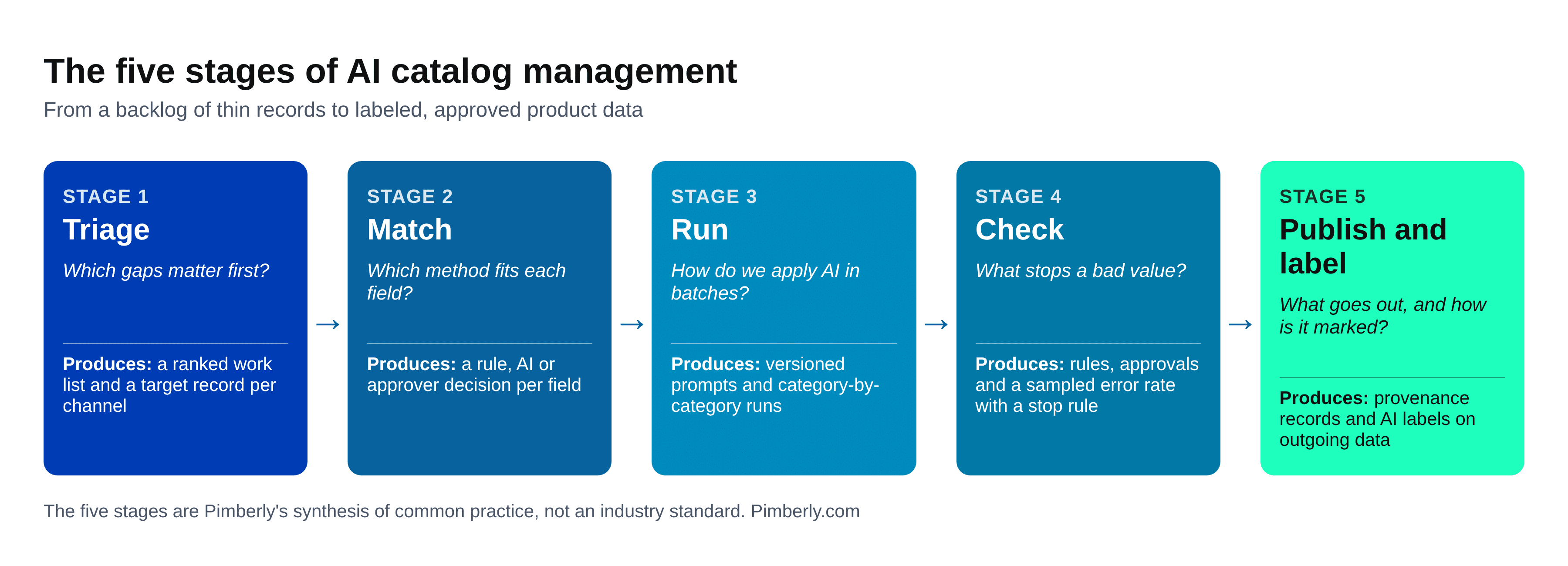
The table below shows what each stage produces and what to set up in Pimberly.
| Stage | Question it answers | What you produce | What to set up in Pimberly |
| 1. Triage | Which gaps matter first? | Ranked work list and a target record per channel | Built-in validation rules |
| 2. Match | Which method fits each field? | A rule, AI or approver decision per field | Validation rules for fixed answers; Pimbles, ColorAI and ImageAI for extraction |
| 3. Run | How do we apply AI in batches? | Versioned prompts and category-by-category runs | Pimbles: custom AI prompts you can run on any number of products, using your choice of LLM |
| 4. Check | What stops a bad value? | Rules, approvals and a sampled error rate with a stop rule | Approval workflows, and human approval on Pimbles outputs |
| 5. Publish and label | What goes out, and how is it marked? | Provenance records and AI labels on outgoing data | Audit trail of Pimble versions; confirm your feed carries Google’s AI labels |
Stage 1: Triage What to Enrich First
Do not start with the AI. Instead, start with a ranked list of what to fix. Score every product group and field on three things:
- Value: how much revenue or traffic the product drives, and how much the channel matters.
- Gap: how far the record falls short of what each channel requires.
- Risk: what happens if the AI gets it wrong.
First, sort risk into three classes. Low risk covers formats, units and category mapping. Medium risk covers descriptions and attributes read from images. High risk covers safety, compliance, claims and pricing. High-risk fields always get an approver.
Next, define the target record for each channel before you run anything. List the required fields, the allowed values and the format for each one. Without a target, you cannot measure a gap.
After that, fix inputs at the source where you can. Messy supplier files create many of the gaps that AI is later asked to fill. Clear supplier product data requirements shrink the backlog before AI touches it.
Here is an illustrative example. We made it up to show the scoring, so the ratings are not benchmarks. A distributor has three product groups:
- Power tools: high value, large gap, medium risk. Start here.
- Fasteners: medium value, mixed units, low risk. Fix with rules first. This is a quick win.
- Electrical safety products: medium value, incomplete compliance fields, high risk. Run later, and only with an approver.
The output of this stage is a ranked work list and a target record for each channel. Everything after it depends on that list.
Stage 2: Match the Method to Each Field
AI is not the right tool for every field. Use a rule where the answer is fixed, AI where it is fuzzy and an approver where a wrong answer is costly. The table below applies that principle to five common tasks.
| Task | Best method | Check it against | Risk | Related post |
| Normalize units and formats | Rules first, AI for exceptions | The channel format spec | Low | See Stage 1 |
| Extract attributes from documents, images and text | AI extraction | The source document or image | Medium | AI for Product Attributes |
| Classify to a taxonomy | AI against an approved list | The approved category list | Low to medium | See Stage 3 |
| Write descriptions from structured attributes | AI generation | The structured attributes it came from | Medium | Using AI for Compelling Technical Product Descriptions |
| Check records | Rules plus AI flags | Required-field and range rules | Low | AI for Data Validation |
The evidence supports this split. In an academic benchmark of attribute extraction from product text, GPT-4 reached an average F1 score of about 86% (Brinkmann, Shraga and Bizer, arXiv preprint). Fine-tuning a smaller model matched that level but generalized less well to values it had not seen.
Read that as good, not perfect. F1 blends precision and recall, so it is not an error rate. Also, at catalog volume, even a small share of wrong values means a lot of records to catch. The study tested older models, so treat it as a signal and not a forecast. That gap is why Stage 4 exists.
Stage 3: Run AI in Batches by Category
Batches turn a prompt into a process. Follow these rules for every task:
- Build one reusable prompt per task and version it. Edits create a new version, never a silent change.
- Pilot on one category. Compare the output with a hand-checked sample before you widen the run.
- Feed structured attributes, not free text, when generating descriptions. Structured inputs keep the output tied to facts.
- Run by category so errors stay local. A bad prompt then affects one category, not the whole catalog.
- Choose the model per task, and log the prompt version, model and run date for every batch.
In Pimberly, Pimbles are custom AI prompts you can run on any number of products, using your choice of LLM. They can be applied across thousands of SKUs with a few clicks. For task examples, see our walkthrough of Pimbles AI workflows.
Stage 4: Check by Sampling Before Anything Ships
No batch should ship on trust. Use three layers of checks:
- Automated rules. Catch missing required fields, bad formats and out-of-range values. Our post on AI for data validation goes deeper on checking records.
- Risk-based approval. Send medium and high-risk fields to a person. The product data governance guide covers approval tiers, so we will not repeat them here.
- Sampling per batch. Review a random sample and record the error rate.
Sampling needs a few rules to work. Pull the sample at random, because reviewing the first rows or the easy products hides problems. Compare each sampled value with its source. Track the error rate by field, not just overall. Then set a stop rule before the run starts: pause the batch when the sample error rate passes a limit your team sets. Use stricter limits for higher risk classes.
Sample size matters too. If you review 60 random records and find no errors, you can be about 95% confident that the true error rate in that batch is under 5%. This is the statistician’s rule of three: divide 3 by the sample size. Reviewing 300 clean records brings the bound down to about 1%. The math assumes a truly random sample. We do not offer a benchmark limit, because the right threshold depends on your risk.
Review matters because AI errors are hard to spot by eye. As our post on why AI enrichment projects fail puts it, “AI-generated errors don’t look like errors.” In its example, a model given a loose prompt returned an IP65 rating that appeared nowhere in the spec sheet. Skipped checks let errors like that reach customers.
Pimbles outputs can go to human approval or be published automatically, so choose per field. Pimbles can also write to back-office fields such as compliance notes. Keep those on approval.
Stage 5: Publish and Label What AI Wrote
Before anything goes out, record where each value came from. Provenance per value should include the source, method, prompt and model version, approver and date. If a customer or channel questions a value later, this record is your answer.
Google’s help page says, “we now require some types of product data to be identified as being AI-generated.” Under that policy, titles created with generative AI go in the structured title attribute. Descriptions go in the structured description attribute. Both use a digital source type of trained_algorithmic_media. Structured title content runs 1 to 150 characters, as the title attribute guide explains. AI-generated images must also keep their IPTC DigitalSourceType metadata, so do not strip it during processing. Your product feed management setup needs to carry these fields.
Your own website has a different risk. Google’s guidance says using generative AI to generate many pages without adding value for users may violate its scaled content abuse spam policy. However, the fix is simple: enrich the product record, and do not mass-publish thin pages.
How to Measure AI Catalog Enrichment and Roll It Out
Take a baseline before the pilot, or you cannot show progress. This makes product catalog enrichment measurable. Track these six metrics:
- Completeness by channel
- Share of sampled values that needed a human edit
- Time to enrich a product
- Share of records approved the first time
- Listings rejected by a channel
- Time to publish
We have left out benchmarks on purpose. Your catalog, risk mix and channels are your own, so your baseline is the only fair comparison.
Then roll out in three steps. First, pilot one category and review every stage. Next, widen category by category, and fix the prompts or rules each time a sample fails. Finally, make it a standing process with a named owner.
How Pimberly Supports Each Stage
Pimberly’s AI features include Pimbles, CopyAI, ColorAI and ImageAI. CopyAI generates and edits marketing copy. ColorAI extracts color data into attributes. ImageAI extracts product details from images into attributes. Pimbles outputs can pass through human approval or publish automatically, and every Pimble keeps a full audit trail of its versions and iterations.
Meanwhile, approval workflows hold a change until it is accepted, so the product stays unchanged until then. Built-in validation rules cover the automated layer of Stage 4. If you are still choosing tools, our guide to the best product catalog management software compares what to look for, including AI with human review.
FAQS
Q: What is AI catalog management?
A: AI catalog management is using AI to fill, standardize, classify and check product data across a whole catalog. Rules and human review are built in, so quality holds as volume grows. It differs from running a prompt on a few products because it adds ranking, batching, sampling and labeling.
Q: How does AI enrich a product catalog?
A: AI enriches a catalog by extracting attributes from text and images, classifying products to a taxonomy and writing descriptions from structured data. It works best inside a process. Rank the gaps, match a method to each field, run in batches and check a sample of every batch.
Q: Can AI enrich thousands of products at once without lowering quality?
A: Yes, but only with checks that scale. Run AI by category, apply automated rules and review a random sample from each batch. Set a stop rule so a failing batch pauses early. Quality drops when teams skip sampling and publish whatever the AI returns.
Q: Which product data should AI never change on its own?
A: Keep an approver on high-risk fields: safety, compliance, claims and pricing. A wrong value there can cause legal or financial harm. Low-risk fields such as formats and units can usually run on rules, with AI handling exceptions and a sample check after each batch.
Q: How accurate is AI at extracting product attributes?
A: In one academic benchmark, GPT-4 reached an average F1 score of about 86% on attribute extraction. That is good but not perfect, and F1 is not an error rate. The study used older models. At catalog volume, sample your own output to measure your real error rate.
Q: Do I have to label AI-generated product content for Google?
A: Yes, for Merchant Center. Google requires AI-generated titles and descriptions to use the structured title and structured description attributes with a digital source type of trained_algorithmic_media. AI-generated images must keep their IPTC DigitalSourceType metadata. Check Google’s current help pages before each feed change.
Q: How do you measure the results of AI enrichment?
A: Take a baseline before your pilot, then track completeness by channel, share of sampled values needing an edit, time to enrich, first-time approval rate, channel rejections and time to publish. Compare each metric with your own baseline instead of an outside benchmark.
Method Beats Volume
The teams that win with AI do not run more prompts. They rank the work, match the method, run in batches, check by sampling and label what AI wrote. That order is what keeps quality steady as the catalog grows.
Pimberly gives you the place to run that process, from reusable Pimbles to approvals and validation rules. And once your product data is clean, the next question is how AI shopping agents read it. Our guide to agentic commerce and product data covers that side.

"With Pimberly we are able to get rich data, right the first time."
JD Sports

A super-quick run through of the key features of Pimberly’s key PIM, DAM and automation functionality.



